DirectAdmin 1.694

fln

Administrator
Staff member
Joined
Aug 30, 2021
Messages
1,299
We are happy to announce the release of DirectAdmin 1.694.

A full release change log is here:

DirectAdmin 1.694


The update should be automatically available for all installations subscribed to the current release channel.

We appreciate all the feedback on forums and issues reported in the ticketing system.

Thanks!
 
After installing 1.694 I also receive a new installation of IMAPSync. I use it quite a lot via an external provider (web interface) and because I didn't read anything about this in the changelog I was wondering if there's documentation for using this version on my own servers and if a web interface is available as well. So I'm not looking for general documentation, but specifically for how DirectAdmin makes it available.
 
using this version on my own servers and if a web interface is available as well. So I'm not looking for general documentation, but specifically for how DirectAdmin makes it available.
Its already there in full DA license but not in Legacy license
 
@fln This version also updates exim.conf from 4.5.61 to 4.5.62, and this is not documented.

It is very important that the changelog always displays all changes in detail, especially in critical components such as the email system. This greatly facilitates troubleshooting and the work of system administrators.

It was great when Exim configurations had their own changelog, but that documentation has been removed.
 
@unihostbrasil, the Exim changes are not really important and affects only a very small portion of users, that have broken configuration. Added a note about it.

@JosKlever, the imapsync, wp-cli and composer are the tools that CustomBuild was able to install, but did not have a dedication option in the options.conf file that would say if you want to have this tool installed or not. In this release CustomBuild got new options composer=yes/no wpcli=yes/no imapsync=yes/no. This made it possible for the CustomBuild to offer tool removal action if you do not want a particular tool to not be installed. Or offer to install this tool if it is not yet installed.

If you have imapsync CLI tool installed on the server you will be able to use it via Evolution UI for importing emails from external IMAP servers or exporting emails.

1770140255052.png
1770140269397.png

The imapsync feature is not new, it was added in DA 1.63.9 released on 2022-04-19.
 
@fln imapsync got only installed after the update today, without changing a setting, so I'm not sure why I didn't have this before. Both of my servers have Standard licenses (no legacy).

I'll check out this functionality later. Thanks for the information!
 
imapsync got only installed after the update today, without changing a setting, so I'm not sure why I didn't have this before.
That is what i meant and not about getting it,
it was installed default by DA, (all our server have that installed) why yours only installed with this version is because DA made some changes
On personal licenses it show without doing anything but on legacy its not visible in DA GUI
 
Because it is quite simple, due to the new default option that fln refers to, you now have imapsync=yes in your config and therefore it installs imap sync. How hard can it be!!!
 
@exlhost Please keep it nice. I'm asking why I got it with this update and not before. Nobody said anything yet that it was a new default value. You are the first. Is that a guess or do you actually know that? It was not mentioned in the changelog or in the answer @fln gave earlier.
 
@JosKlever, if your server was installed before imapsync feature was introduced, you did not get it installed during the initial server setup. Administrators of the old servers had to manually execute da build imapsync to get it. For servers installed after imapsync feature was released DA installer made sure to also install imapsync tool (during the da build all stage).

This small change to create a configuration option for the imapsync tool helps server administrators to become aware about this feature. Up till now new servers would silently get it, while old servers would silently NOT get it. Now all the servers will see it is available as software managed by CB unless administrator explicitly tells CB he does not want this tool. To do it server administrator has to set imapsync=no in the CustomBuild options.conf file.
 
In this release CustomBuild got new options composer=yes/no wpcli=yes/no imapsync=yes/no.

Any particular reason this information is not in the changelog? It's really frustrating that the changelog often does not actually contain all changes.
 
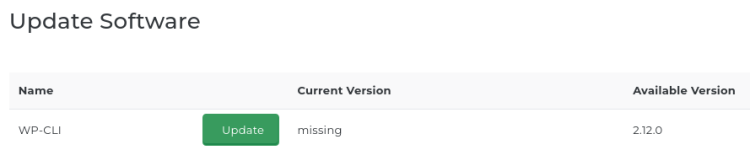
After installing the latest update this was shown, I never installed WP-CLI on the machine so why is it showing up now?
 

Attachments

  • WP-CLI.png
    WP-CLI.png
    16.1 KB · Views: 8
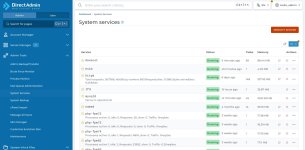
Here's another issue: the service monitor is gone and now renamed "System services" however it's a lot less easy to read as in no PID's and the previous system with PID's make it easier to 'read' the information imho. The previous version looked like this: https://evo.site-helper.com/evo/admins/ainfo.html#system-services-information-1 attached is what I see now and I must say somehow the previous version is a lot les easier on the eye and, imho, more informative.
 

Attachments

  • system services.jpg
    system services.jpg
    139.1 KB · Views: 5
Last edited:
@kristian, we discard some changes as not relevant if we believe it would not have meaningful impact or affect a very small portion of the whole user base. A note about new CB options is added to the change-log. This change seems to affect more users than we expected. Thanks for bringing it up. A full change-log between 1.693 and 1.694 would be ~120 entries. It would add too much noise documenting all of them so we try to keep a good balance and include only the most important ones. In cases like this (when users are asking about the changes that were not documented) we readjust our change-log filling policy to make it more accurate in the future.

@brinkie, the WP-CLI is showing up because CustomBuild can install it. If you do not want to use it please disable it in the CustomBuild options.conf file.

The full list of PIDs for each service takes a lot of space and adds no substantial value. The problem of PIDs being and excessive data in that page were highlighted when we started accurately reporting all PIDs for the dovecot service. All the service actions like start, stop, restart, reload does not require user to know or enter service PID/PIDs. In other words letting user know the service PID or PIDs does give user anything useful or actionable.
 
In other words letting user know the service PID or PIDs does give user anything useful or actionable.

For me, seeing, for example, a high server load + huge number of PID's on http or another service was a good and fast visual signal where to look for trouble.
 
  • Like
Reactions: fln
The new UI has a column tasks, that roughly corresponds to the number of processes this service has started. For multi-threaded processes it also counts threads, so the number is higher than just a simple count of processes. But from the kernel perspective the threads are like lightweight processes (it occupies a single CPU core if it is being executed). The abnormal number in that column is an indicator that the service is quite busy.
 
Am I the only one getting Exim SNI issues after updating to version 1.694? Check my error after the update. Also, DNS record types HTTPS and SVCB do not work when I attempt to enable HTTP3 for my domains:

Unable to save dns zone: named-checkzone returned:
loading "xxx.com" from "/var/named/xxx.com.db.temp.322786.jIEvWABIBh" class "IN"
/var/named/xxx.com.db.temp.322786.jIEvWABIBh:56: unknown RR type 'HTTPS'
zone xxx.com/IN: loading from master file /var/named/xxx.com.db.temp.322786.jIEvWABIBh failed: unknown class/type
zone xxx.com/IN: not loaded due to errors.
 
Back
Top