SSL Certificates page changed – missing options

iPwsite

Verified User
Joined
May 9, 2020
Messages
28
Hi everyone,

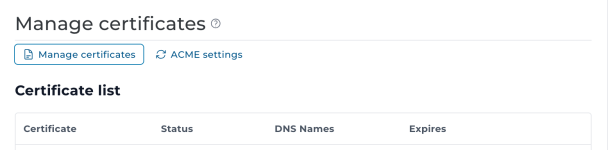
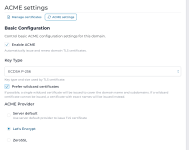
My DirectAdmin SSL Certificates page has changed to a "Manage certificates" view with only ACME settings and a certificate list. The usual options are gone:

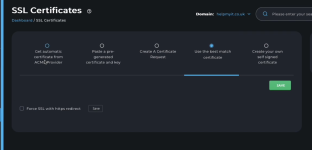
  • Get automatic certificate from ACM Provider
  • Paste a pre-generated certificate and key
  • Create A Certificate Request
  • Use the best match certificate
  • Create your own self signed certificate
Also, I can only access DirectAdmin via server IP (not server.example.com:2222) – that domain doesn't resolve.

Anyone know how to get the missing options back or how to access the full SSL menu?

Thanks.
 

Attachments

  • SSL.png
    SSL.png
    186 KB · Views: 54
  • Screenshot 2026-07-22 at 05.10.42.png
    Screenshot 2026-07-22 at 05.10.42.png
    51.2 KB · Views: 53
  • Screenshot 2026-07-22 at 05.10.48.png
    Screenshot 2026-07-22 at 05.10.48.png
    179.7 KB · Views: 52
I had this yesterday and had to figure it out. Select the Manage Certificates link and if certificates are not yet there, scroll down and select Provision New certificates.

It actually works much easier when you figure that out and have ACME enabled with your current settings there.
 
@iPwsite, the same functionality already exists in the new interface. Here are the expected usage flows:

Case 1 - Use ACME for everything

Make sure the "Enable ACME" checkbox is on, no more changes are needed. As long as your domains reaches the DA server they will get ACME certificates.

Case 2 - Buy a certificate from another CA

If you already have either ACME or self-signed certs use the action "Create signing request"

1785245267255.png


It will create CSR that you can use to buy a new certificate. Once you get the certificate upload it using the "Replace" action. No need to replace the private key. The CSR is generated for the existing key.


If you do not have any certificates for the domain, first create a self signed certificate using the "Install self-signed certificate" action:

1785245520761.png

This action will generate a private-key and a temporary certificate. This will allow you to then create a CSR request for that key. Once you get a custom certificate use the "Replace" action to upload it.


Let us know if there is a scenario that you can not achieve using the new interface.
 
Back
Top