Changing FROM address on DirectAdmin messages

MarioG

New member
Joined
Nov 3, 2026
Messages
6
I apologize if this subject has been covered, but I can't find it. There was a topic "Incorrect FROM Header in DirectAdmin messages", but it went on over years with complicated scripts. I have also tried for more than 2 hours to resolve the issue with numerous searches and AI questions that lead me in circles.

My DirectAdmin host on Debian 12 is running Exim with the standard DirectAdmin setup, on a server named 'rn2.domain.com'. When DirectAdmin sends messages, like "Software Updates", it attempts to send to the correct email, but the FROM address is '[email protected]'. My goal is simple:

I want to change outgoing administrative emails from DirectAdmin from using the '[email protected]' address to using '[email protected]'.

So far I have edited many config files, done rebuilds, setup aliases, rewrites, restarted exim, and still the sending email is '[email protected]'.

This seems like it should be such a simple task, and I'm spinning my wheels. Any guidance is appreciated.
 
Hello,

The sender address is the admin's email address set in their user's details. To change the sender's address update the contact email of admin.
 
Hello, and thank you for your reply. But besides wanting seperate 'from' and 'to' emails, the mail system doesn't seem to be using the Admin's email for the 'From' address. Sorry if I'm missing something.

I am using the DirectAdmin Personal Plus license, and I have a single user, 'Admin'. When I go to the profile ( Dashboard/User Profile/General), it shows my gmail address, which is where I would like to receive notifications, like software updates or backups.

But, when emails go out from the system, like Software Updates, they go out under the name '[email protected]'. I want to change this 'From' address.

For background purposes, I have several servers of different types. And each server sends notifications to the same gmail account, using a From address that identifies each server. This way I can categorize and prioritize server notifications. This is my first time using DirectAdmin.

Here is my Admin email setting:

Screenshot 2026-11-09 073734.png


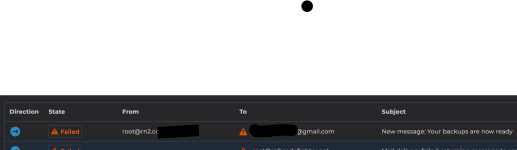
And here is the report of sent emails (note I am not concerned delivery failed, I am concerned it shows '[email protected]' as 'From'):
Screenshot 2026-11-09 073937.png
 

Attachments

  • Screenshot 2026-11-09 073937.png
    Screenshot 2026-11-09 073937.png
    27 KB · Views: 16
Thank you again for your assistance. Yes, the image on my previous post that shows the root@ address is from DirectAdmin, regarding the completion of the admin backup. I have also seen it in emails where DirectAdmin tells me there are updates available.

This root@ the same From address that any CLI sends (which would make sense when the [email protected] is the logged-in user), for example:
root@rn2:~# /usr/sbin/exim -t << 'EOF'
To: [email protected]
Subject: Test CLI Email via Exim
This is the body of the email sent directly through Exim.
EOF
And I receive this email:

1794311120252.png


But back to the basic question if I may: Are you saying that the only way to change the 'From' address is by changing the Admin user's email address? This implies that all administrative emails have to come from, and go to, the same address. It also implies a problem when something like the address is a gmail account, where things like authentication and records like SPF and DKIM would cause a problem, no?
 

Attachments

  • Screenshot 2026-11-10 064137.png
    Screenshot 2026-11-10 064137.png
    43.2 KB · Views: 7
For more background information: I am using the DirectAdmin Personal Plus subscription as previously mentioned. I have not created any additional users, and am only using the Admin login for management. I personally am the only administrator for all sites, so all sites belong to Admin. I have been reading the article about From addresses here:

It mentions user.conf. I have a user.conf for the root user (/root/user.conf), and one for the admin user (/usr/local/directadmin/data/users/admin/user.conf). I can change the admin's file through the web portal, but not root's file. I manually changed the name and email settings to my From preference, restarted DirectAdmin service, but it made no difference so I put everything back.

My method of testing the 'From' address is to login as Admin, create a backup, and when the backup completes to see where the 'Your backups are now ready' message comes from (and it's always [email protected]).
 
and when the backup completes to see where the 'Your backups are now ready' message comes from (and it's always [email protected]).
Strange, normally they are send from something like [email protected] by default if I'm not mistaken.

If they come from [email protected] then I have the impression something might have been setup wrongly. Did you use an alias for root or something?
I always let root mails be send to a seperate mail address. To have this accomplished I adjust either the /etc/aliases file and change
#root: marc
to
root: [email protected]
and then restart exim and then root mails are send to that address.

For Debian (and deratives) this might nog work so there I use the forward method by creating a .forward file in /root with that e-mail address as content of the file.

You might try to change that and see what happens then with the next mails.

Normally if you change the admin email address like you did, things should be fine for directadmin mails.
 
Strange, normally they are send from something like [email protected] by default if I'm not mistaken.

The address is usually used in Return-path. The other headers in emails from DirectAdmin are changeable as mentioned earlier by me.

Code:
To: poralix <*****@***************>
From: cp1.***************.nl <support@***************.nl>
Sender: cp1.***************.nl <support@***************.nl>
Reply-To: cp1.***************.nl <support@***************.nl>

where support@***************.nl is the email of admin in user.conf

Code:
[root@cp1.***************.nl poralix]# grep support@ /usr/local/directadmin/data/users/admin/* 2>/dev/null
/usr/local/directadmin/data/users/admin/user.conf:email=support@***************.nl
[root@cp1.***************.nl poralix]#

When sending emails from CLI no settings in directadmin are used.
 
The address is usually used in Return-path.
Yes but I wrote by default (so without changing). So if no admin email address is setup, isn't mail also send from that address? Or from admin@hostname? But as far as I know not from root@hostname, that what I was trying to make clear, that it wouldn't be root@ mail.

Would be great if there was a very easy way to change that return path to match the sender address by the way.
 
Thanks again all for your input.

zEitEr: "The CLI sending has nothing to do with DirectAdmin at all."
I was only noting that they were coming from the same address. The emails from DirectAdmin, like System updates or backups complete, are coming from the same problematic address: [email protected].

Richard G: I may have setup something wrong, but I can't find it. I general make backup files, test a change, and if it doesn't work, restore the backup.
As far as I know the /etc/aliases is for incoming emails, where my problem is outgoing. But, I have tried that setting, and restored it.
DirectAdmin attempts to send emails to the correct gmail.com address, but does so from [email protected]. I want it to send from '[email protected]'.

I may just try to setup a VPS for testing, with a new DirectAdmin, to see what all the defaults are again. I will make note that this DirectAdmin host was created and restored from the backup of another DirectAdmin host, for the Admin user and all domains.

I apologize if I'm being dense here, but I just can't figure out how to have DirectAdmin send it's notification emails to [email protected] but make the from, reply-to, and sender, all '[email protected]'
 
I may just try to setup a VPS for testing, with a new DirectAdmin, to see what all the defaults are again.
That would be a smart idea, because for some reason the root account is connected to DA. And as said, by default DA does never send mails from any root@ account, only CSF is doing that.
Maybe a test setup can show you what the issue is causing. At this moment I don't really have an idea why mails are send as root.
 
I apologize if I'm being dense here, but I just can't figure out how to have DirectAdmin send it's notification emails to [email protected] but make the from, reply-to, and sender, all '[email protected]'

The solution is already mentioned earlier. And headers from an email are posted in the post #9
I can even add once more and the final time here:


Bash:
To: poralix <root@server1.****.nl>
From: server1.****.nl <support@****.nl>
Sender: server1.****.nl <support@****.nl>
Reply-To: server1.****.nl <support@****.nl>
MIME-Version: 1.0
X-DirectAdmin-Sender: diradmin
Subject: New message: Warning: The system load average is 20.26
Message-Id: <E1xRHBf-00000008EY7-3Mw5@server1.****.nl>
Date: Wed, 11 Nov 2026 23:53:03 +0100
X-Authenticated-Id: diradmin


This is an automated message notifying you that the 5 minute load average on your system is 20.26.
This has exceeded the 20 threshold.

This is an email from DirectAdmin and generated by DirectAdmin. As you can see headers "From:", "Sender:" and "Reply-To:" have a custom email address, which is stored in /usr/local/directadmin/data/users/admin/user.conf.

It is not username "support", it is still "admin" account with an email "support@****.nl"

The Return-Path still points to:

Code:
Return-Path: diradmin@server1.****.nl

even here it is not root@server1.****.nl

If the mentioned way does not change headers "From:", "Sender:" and "Reply-To:" to a custom value, and you still see [email protected], then your installation might be too heavily customised. And hardly can we guess in which direction you would need to go.

So again, the solution works, and you might really try a fresh installation of DA on a VPS to see it's working.
 
Back
Top