
Administrator setings error / getting current timezone

Aar

Verified User
Joined
Feb 10, 2005
Messages
192
Location
Netherlands
The [server] tab in the Admin > Administrator Settings gives a Server error.

Is this bug also known? Or is it something else?
I cannot find the correct server error log that goes with it.
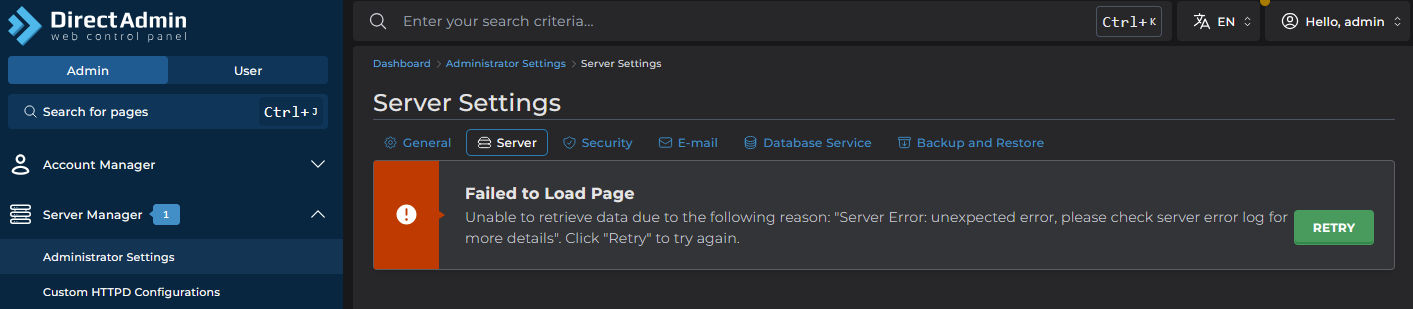
1790594083375.png
 
@Aar, maybe some of the directadmin.conf values are malformed. More details should be visible in the directadmin service error log:

Code:
journalctl -u directadmin.service --since today -p err
 
@Aar some time ago I saw such issue:
Code:
[root@core ~]# curl -s -XGET $(da api-url --user=admin)/api/server-settings/timezone/current | jq '.'
{
  "message": "unexpected error, please check server error log for more details",
  "type": "INTERNAL_ERROR"
}
[root@core ~]#

And the fix can be this, because TIMEZONE was broken or set incorrectly:
Code:
[root@core ~]# curl -s -XPOST $(da api-url --user=admin)/api/server-settings/timezone/set -d '{"tz":"UTC"}' | jq '.'
[root@core ~]#
[root@core ~]# curl -s -XGET $(da api-url --user=admin)/api/server-settings/timezone/current | jq '.'
{
  "tz": "UTC"
}
[root@core ~]#
 
@fln It does indeed look like that what @romans says.

Code:
Sep 28 13:13:18 web01.myserver.nl directadmin[617425]: getting current timezone error=readlink /etc/localtime: invalid argument req-uri=/api/server-settings/timezone/current req-user=admin

What is the best way to fix it?
This?

Code:
curl -s -XPOST $(da api-url --user=admin)/api/server-settings/timezone/set -d '{"tz":"UTC"}' | jq '.'
To set this.
Code:
curl -s -XGET $(da api-url --user=admin)/api/server-settings/timezone/current | jq '.'
To check it?
 
Last edited:
@Aar what is /etc/localtime file on your DA server ? Is it link or file ?

It must be the link like:
Code:
[root@core1 ~]# ls -la /etc/localtime
lrwxrwxrwx 1 root root 38 Sep 28 08:42 /etc/localtime -> ../usr/share/zoneinfo/America/New_York
[root@core1 ~]#
...
[root@server2 ~]# ls -la /etc/localtime
lrwxrwxrwx 1 root root 25 Sep 28 12:39 /etc/localtime -> ../usr/share/zoneinfo/UTC
[root@server2 ~]#
If it is file - empty or not, like:
Code:
[root@server2 ~]# rm -fv /etc/localtime
removed '/etc/localtime'
[root@server2 ~]#
[root@server2 ~]# touch /etc/localtime
[root@server2 ~]#
[root@server2 ~]# ls -l /etc/localtime
-rw-r--r-- 1 root root 0 Sep 28 12:42 /etc/localtime
[root@server2 ~]#
then you will have exactly that error:
Code:
[root@server2 ~]# curl -s -XGET $(da api-url --user=admin)/api/server-settings/timezone/current | jq '.'
{
  "message": "unexpected error, please check server error log for more details",
  "type": "INTERNAL_ERROR"
}
[root@server2 ~]#
So, you can try just remove /etc/localtime file (if it is really file) and create symlink to the correct TimeZone file if you do not want to apply the fix I provided above, like:
Code:
[root@server2 ~]# rm -fv /etc/localtime
removed '/etc/localtime'
[root@server2 ~]#
[root@server2 ~]# cd /etc/
[root@server2 etc]#
[root@server2 etc]# ln -s ../usr/share/zoneinfo/UTC localtime
[root@server2 etc]#
[root@server2 etc]# ls -la /etc/localtime
lrwxrwxrwx 1 root root 25 Sep 28 12:46 /etc/localtime -> ../usr/share/zoneinfo/UTC
[root@server2 etc]#
After that CURL request to DA page works fine:
Code:
[root@server2 etc]# curl -s -XGET $(da api-url --user=admin)/api/server-settings/timezone/current | jq '.'
{
  "tz": "UTC"
}
[root@server2 etc]#
 
@romans Thanx. It was not a symlink, and i have fixxed this. The output is now:
Code:
[root@web01 admin]# timedatectl                                                                

Local time: Mon 2026-09-28 15:18:26 CEST
Universal time: Mon 2026-09-28 13:18:26 UTC
RTC time: Mon 2026-09-28 15:18:27
Time zone: Europe/Amsterdam (CEST, +0200)
System clock synchronized: yes
NTP service: active
RTC in local TZ: no

Admin serversetting are working now properly.
But why was it suddenly broken in the Admin panel? Or has DA recently changed something about this, and did it work differently before and was this setting ignored?
 
I checked 4 servers I have and everywhere /etc/localtime is symlink there. So, I cannot say if and how it worked in DA Panel before in your case. Maybe @fln can provide some insides for this case.
 
Back
Top