

Richard G
Verified User
Just asking this to be sure. I've set up rspamd and now trying to let rspamd learn automatically.
I've seen a guide but that had a several comments so I'm using the instructions from the DA docs:
https://docs.directadmin.com/other-...omatically-marking-moved-mail-to-junk-as-spam
Now the question is about the middle part.
Below there is a link:
Related: spam_inbox_prefix_name=INBOX.spam
In the docs I see "spam" and "ham" and in the sa-learn copy part there is "spam" again
If I check the DA mailboxes in webmail I see this:
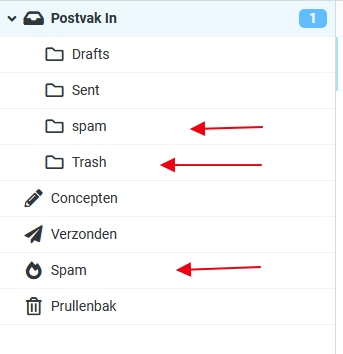
So 2 different boxes called spam (1 with capital and one not) and a Trash folder.
When checking as root in the mailbox folders I see they all heb the INBOX prefix and one without and with a dot in front of the name and even one with a complete different name, like this.
.INBOX.spam
.INBOX.Trash
.Junk (this one I don't see in webmail)
.Trash
I'm not native English so this is very confusing to me. When following the docs, can I just copy and paste the instructions?
Or do I need to change everywhere where it says "spam" to .INBOX.spam or INBOX.spam without the dot in front?
And I don't have any "ham" folder which I read here:
And what is the .Junk and .Trash then for which are not visible in webmail?
I've seen a guide but that had a several comments so I'm using the instructions from the DA docs:
https://docs.directadmin.com/other-...omatically-marking-moved-mail-to-junk-as-spam
Now the question is about the middle part.
if environment :matches "imap.mailbox" "spam" {
and
if environment :matches "imap.mailbox" "Trash" {
Below there is a link:
Related: spam_inbox_prefix_name=INBOX.spam
In the docs I see "spam" and "ham" and in the sa-learn copy part there is "spam" again
If I check the DA mailboxes in webmail I see this:
So 2 different boxes called spam (1 with capital and one not) and a Trash folder.
When checking as root in the mailbox folders I see they all heb the INBOX prefix and one without and with a dot in front of the name and even one with a complete different name, like this.
.INBOX.spam
.INBOX.Trash
.Junk (this one I don't see in webmail)
.Trash
I'm not native English so this is very confusing to me. When following the docs, can I just copy and paste the instructions?
Or do I need to change everywhere where it says "spam" to .INBOX.spam or INBOX.spam without the dot in front?
And I don't have any "ham" folder which I read here:
pipe :copy "sa-learn.sh" [ "ham" ];
And what is the .Junk and .Trash then for which are not visible in webmail?