
How do you educate customers about maintaining their hosting accounts?

sysdev

Verified User
Joined
Jul 16, 2007
Messages
511
The recent tsunami of updates and security fixes has once again shown how much work we, as admins and hosting providers, have to do to keep servers reasonably secure and up to date. Most of us probably monitor our servers from an admin point of view: OS updates, DirectAdmin updates, PHP versions, webserver logs, mail queues, security tools, backups, abuse handling, and so on.

But there is another side to this: the customer’s own responsibility inside their hosting account.

Examples I regularly see, or try to prevent, are things like:
  • uploading their own pma or admin tools in a subdirectory and never updating them
  • old WordPress installs, themes or plugins
  • test sites that are forgotten but still publicly reachable
  • outdated PHP versions because “the site still works”
  • unmanaged mailboxes, full mailboxes, weak passwords or old forwarders
  • nobody checking 4xx/5xx errors until the site is completely broken
  • unused domains, subdomains or databases left behind for years.
As providers, we can patch the server, harden the stack, run backups, monitor abuse and block attacks, but we cannot always know whether something inside a customer account is still intentional, maintained or safe. And if we find something weird, mentioning it to the customer is like 'Yeah, I check the stuff you do on your 'private' hosting account...'

So my question is:

Do you actively educate your users about these things?
And if so, how?

For example:
  • Do you send periodic security or maintenance reports?
  • Do you warn users about outdated PHP versions, CMS installs or suspicious files?
  • Do you provide a checklist for customers?
  • Do you scan hosting accounts and report findings back to the customer?
  • Do you enforce cleanup or only advise?
  • Do you have any automation around this?
  • What actually works in practice, without overwhelming non-technical users?
I am mainly looking for practical ideas from other hosting providers. We are considering improving our own customer-facing checks and reports, and I am curious what others are doing to help customers maintain their part of the hosting environment.
 
This is an interesting topic, and I'll look forward to seeing what others have to say on this. I don't know if I really have an answer for this, but it's definitely something that needs to be addressed. It's easy for us as server administrators to know the value in keeping things up to date and this probably creates a bit of tunnel vision for us. We see the security issues and know that it's important to keep them at bay, but that doesn't necessarily translate to actual hosting customers / end users.

I will add this. One thing that we do, if we find an account has been compromised and exploited - more times than not it's a WordPress site because most of our hosting is WordPress. I'm not one to really rag on WordPress, I think for the most part they stay on top of security issues and release updates when necessary. But that does end users no good if they are not installing those updates. I think WordPress gets a bad rap because end users expect it to keep itself secure and they don't realize that there's actual work on their part to do that. WordPress can only do so much, they can't hold everyone's hand and make sure they are following sound security.

More times than not, when a WordPress site is compromised it's due to one of two things. Either the WordPress is out of date or a theme or plugin is out of date or abandoned, or they've had their admin dashboard credentials compromised. How the admin credentials get compromised is beyond the scope that we as server administrators are able to see. Are you using simple passwords? Are you reusing passwords with other services that maybe have been compromised? Is your computer or device infected with malware or keyloggers? We (server administrators) simply cannot know.

But in regards to outdated or abandoned plugins, if we find an account is compromised and exploited, we look to see if they are using any outdated or potentially abandoned plugins. What constitutes a potentially abandoned plugin (and by this I mean the developer of the plugin has stopped developing it)? It's subjective. But a plugin that has had an update released in the past 60 days is more likely to be in development than a plugin who's last release was 6 years ago. But potentially abandoned plugins are a security concern. You may be using the latest version of that plugin, but if it was last updated 6 years ago that doesn't mean a whole lot.

We will usually send the customers a list of the plugins they are using and whether or not they are using the latest version and then highlight plugins that haven't been updated in a while. We usually send a link to the plugin's directory page at wordpress.org (if it's registered there) and sometimes this can be helpful, for a plugin such as:

https://wordpress.org/plugins/really-simple-popup/

The banner that says "This plugin hasn’t been tested with the latest 3 major releases of WordPress. It may no longer be maintained or supported and may have compatibility issues when used with more recent versions of WordPress." helps to drive home the point that the plugin has probably been abandoned by it's developer. But whether or not that really gets taken to heart by customers, I don't know.

Another thing, which probably doesn't help a whole lot - but I cringe every time I see a web hosting provider providing this relates to end-of-life versions of PHP. When a PHP version goes end-of-life, let it die. Don't hold on to some "hardened" version of the PHP to satisfy a client's unwillingness to keep their scripts up to date, that's doing more harm than good.

That's no reason why any shared hosting account should be using PHP 7.4 or older. If you will pull the PHP versions after they go end of life (you don't necessarily have to be strict to the date that it goes end-of-life) then when clients write in wondering about why their script isn't working, it's a teaching moment where you can educate the user on the importance of keeping the script up to date. No update for the script? Then it's an abandoned script and shouldn't be used on that principle.

Some might argue that a PHP's lifetime is too short and that maintaining old code is alright. And I could possibly agree with this. But company's that are legitimately requiring this PROBABLY have an in-house developer or someone that is actively maintaining the code. I tend to refer to this as Enterprise Hosting, I'm not sure if that's really correct or if there is another name for this. But a company that is doing this, using an end-of-life version of PHP and personally maintaining the scripts they are using, probably shouldn't be using $5/mo shared hosting. End of life PHP is not meant to be kept around so you can use a WordPress plugin that hasn't been updated in 11 years. But again, I don't know if clients really take this to heart. There's always some other web hosting company that will let you choose PHP all the way down to 5.3 and I would argue those company's don't really care about your website's security.

That's just some thoughts that I have. Like I said, I'll be watching this thread and it will be interesting to see what others have to say about this.
 
Thanks for the detailed response. You actually gave me another idea: for users who install applications through Installatron, I might be able to pull some of that application metadata directly from there and include it in our own checks. That would at least give some insight into WordPress versions, plugins, themes, and possibly whether something looks stale or abandoned.

The PHP issue is exactly one of the things I struggle with.
Most users, including small business users, do not really act on a “this PHP version is end-of-life” warning. Some will try a newer PHP version, see that the site breaks, and then immediately switch back. From their point of view the site was working, then “the host changed something”, and now the host has to fix it.
But in many cases they could have seen the problem coming if they had been looking at PHP warnings, deprecated notices, error logs, abandoned plugins, outdated CMS versions, etc. The problem is: they don’t. And honestly, I understand why.

DA is good, but for an average non-technical user it is still complicated once something actually has to be diagnosed. If a website sends mail but the mail does not arrive, you may need to look at web logs, mail logs, SPF, DKIM, DMARC, DNSSEC, TLSA, mail routing, spam scores, forwarders, full mailboxes, and so on. For us that is normal work. For many users it is basically Chinese.

The same applies to disk usage, memory usage, process limits, PHP errors, 4xx/5xx errors, old test sites, forgotten subdomains, unused databases, and large numbers of mailboxes. Sometimes a user has so many mail accounts that mail alone consumes a surprising amount of their available resources, but they have no idea that this is happening.

A while ago I started working on a DA plugin to help with this. The basic idea is simple: collect the same kind of data the user could already see in DA, but present it in a way that is actually useful to them.

Because that is the main issue in my opinion: the data is already there, but it is not information yet.

A user can technically see their usage, domains, PHP version, mailboxes, DNS settings, logs, errors, limits, and so on. But they often do not know:
  • where to find it
  • what it means
  • whether it is important
  • what caused it
  • what they should do next
  • whether they can safely ignore it
So the direction I am exploring is to turn that raw account data into customer-facing explanations and checks. Not just “you have errors in your logs”, but something closer to:
  • Your site is still running on an old PHP version. There are also PHP warnings in your logs that suggest this plugin/theme may not be fully compatible with newer PHP versions. You should update or replace this component before the old PHP version is removed.
  • This subdomain appears to exist, but it has not received normal traffic recently and is still publicly reachable. If it is an old test site, consider removing it or restricting access.
  • Several mailboxes are unused or nearly full. This may affect mail delivery or account resource usage.
I don’t want to turn this into a “the host scans and fixes everything for you” system, because that creates the wrong expectation. But I do think we can do a better job of translating technical signals into something users understand before things become urgent.

In other words: not just monitoring from the server/admin point of view, but also giving the customer a kind of periodic health report for their own hosting account.

I am still experimenting with how far to take this. It needs to be useful without becoming noisy, and it should educate users instead of just alarming them. But I think that is where the opportunity is: most customers are not unwilling to maintain things, they just do not know what to look at until something breaks.

Your point about abandoned plugins is a good example of something that would fit nicely into that kind of report. The fact that a plugin is technically “up to date” does not mean much if the last release was six years ago. That distinction is probably obvious to us, but not to the average customer.

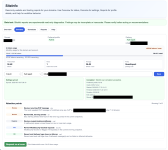
I've a attached a screenshot of where I'm at right now. The plugin (on the DA site) doesn't really do much, most is offloaded to a backend vm where scripts make sense of the data and (if enabled) uses a local LLM to convert findings to something readable. It then mails up to 7 pdf's that focus on either a website owner, the developer, the security person, etc.

I'm not sure yet if this is going to make a difference and maybe I just wasted a couple of weeks on a noble but useless idea :)
 

Attachments

  • d0.png
    d0.png
    697.6 KB · Views: 14
We stopped using Installatron long ago because Softaculous is not only cheaper, but also has better support as we experienced.
However, we did warn customers to keep their installations up to date and they get warned that too old versions either get suspended or at a certain point updated by us without any warning with the risk that things might stop working due to out of date addons or things like that, and no support if they stop working then, so they need to keep things up to date.

Ofcourse we would give some support, but we won't tell them that.

As for outdated PHP versions, we got 3 running, if the last one is EOL it might be running for maybe until 6 months after EOL, often shorter.
About 2 months before we change it, we send out a mail to all customers that their websites need to be checked for higher PHP compatibility and that they can test it by changing the PHP version via the selector.
About 2 weeks before the change, we use the option to just change the PHP version to a new version, for all customers still using older PHP.

If things then don't work, they might complaint, and we point out to our mail and the fact that we will set it back for them, but they have maximum of 2 weeks to fix it, before the PHP version is removed completely.

After that period, we just remove that PHP version, but we ever hardly experience users which do not update after the first mail and only 1 time a customer who needed to update after the 2 weeks warning.
Collegue of mine had 1 complaining that he wouldn't update and things should keep working, and he was pointed out the agreements and points of security in there and got the choice to either upgrade or move to another hoster which he did.

So we first inform/advise, then warn, and then cleanup.

What actually works in practice, without overwhelming non-technical users?
For Wordpress most users can update their addons easily from within there. For WP itself they can use Softaculous too.
For custom made websites we advise in time to get knowledgeble people to fix things in time.

We regularly check via Softaculous the outdated software versions and we also regularly check which PHP versions are running and which accounts have them running. So it's more easily to determine which customers might need some more monitoring if they fix things in time or need a message from either us or via Softaculous (you can force message there too).

Our customers luckily don't use their own pma tools. We also disable these kinds of tools in Softaculous.
 
For me, this is one of the reasons why shut up shop.... Updates to WordStress, custom themes that were years old, and, not to mention, rude customers who wanted the moon on a stick for the price of Maccy D's - can you do this, can you create this......
 
Back
Top