Logrotate won't start

grandm1961

Verified User
Joined
Nov 30, 2020
Messages
78
Location
Wijhe
My log rotate won't start it gives an error and I just can't figure out why it doesn't.

this is what I am getting:
× logrotate.service - Rotate log files
Loaded: loaded (/usr/lib/systemd/system/logrotate.service; static)
Active: failed (Result: exit-code) since Wed 2026-01-14 11:39:18 CET; 11s ago
TriggeredBy: logrotate.timer
Docs: man:logrotate(8)
man:logrotate.conf(5)
Process: 46410 ExecStart=/usr/sbin/logrotate /etc/logrotate.conf (code=exited, status=1/FAILURE)
Main PID: 46410 (code=exited, status=1/FAILURE)
CPU: 25ms
Jan 14 11:39:18 server.duraweb.eu systemd[1]: Starting Rotate log files...
Jan 14 11:39:18 server.duraweb.eu logrotate[46410]: error: httpd:3 duplicate log entry for /var/log/httpd/access_log
Jan 14 11:39:18 server.duraweb.eu logrotate[46410]: error: found error in file httpd, skipping
Jan 14 11:39:18 server.duraweb.eu systemd[1]: logrotate.service: Main process exited, code=exited, status=1/FAILURE
Jan 14 11:39:18 server.duraweb.eu systemd[1]: logrotate.service: Failed with result 'exit-code'.
Jan 14 11:39:18 server.duraweb.eu systemd[1]: Failed to start Rotate log files.

I have checked the logs, but all I see is attempts to hack my server and nothing out of the ordinary.
I have this in logrotate.d/apache
/var/log/httpd/access_log /var/log/httpd/agent_log /var/log/httpd/error_log /var/log/httpd/referer_log /var/log/httpd/suexec_log /var/log/httpd/sulsphp_log /var/log/httpd/ssl_request_log {
missingok
sharedscripts
postrotate
/bin/kill -USR1 `cat /var/run/httpd.pid 2>/dev/null` 2> /dev/null || true
endscript
}

/var/log/httpd/modsec_audit.log /var/log/httpd/modsec_debug.log {
missingok
notifempty
sharedscripts
copytruncate
postrotate
/bin/kill -USR1 `cat /var/run/httpd.pid 2>/dev/null` 2> /dev/null || true
endscript
maxsize 10M
}
this in log rotate.d/httpd
# Note that logs are not compressed unless "compress" is configured,
# which can be done either here or globally in /etc/logrotate.conf.
/var/log/httpd/*log {
missingok
notifempty
sharedscripts
delaycompress
postrotate
/bin/systemctl reload httpd.service > /dev/null 2>/dev/null || true
endscript
}
and this in log rotate.conf
# see "man logrotate" for details

# global options do not affect preceding include directives

# rotate log files weekly
weekly

# keep 4 weeks worth of backlogs
rotate 4

# create new (empty) log files after rotating old ones
create

# use date as a suffix of the rotated file
dateext

# uncomment this if you want your log files compressed
#compress

# packages drop log rotation information into this directory
include /etc/logrotate.d

# system-specific logs may be also be configured here.
here is my /usr/lib/systemd/system/logrotate.service
# hardening options
# details: https://www.freedesktop.org/software/systemd/man/systemd.exec.html
# no ProtectHome for userdir logs
# no PrivateNetwork for mail deliviery
# no NoNewPrivileges for third party rotate scripts
# no RestrictSUIDSGID for creating setgid directories
LockPersonality=true
MemoryDenyWriteExecute=true
PrivateDevices=true
PrivateTmp=true
ProtectClock=true
ProtectControlGroups=true
ProtectHostname=true
ProtectKernelLogs=true
ProtectKernelModules=true
ProtectKernelTunables=true
ProtectSystem=full
RestrictNamespaces=true
RestrictRealtime=true
I remember that when I setup this server I had selinux enabled and I remembered it to disable it for directadmin, might that be the problem?
And how to resolve this?
 
What will you get?

Code:
grep '/var/log/httpd/access_log'  /etc/logrotate.conf /etc/logrotate.d/*
I get this:
/etc/logrotate.d/apache:/var/log/httpd/access_log /var/log/httpd/agent_log /var/log/httpd/error_log /var/log/httpd/referer_log /var/log/httpd/suexec_log /var/log/httpd/sulsphp_log /var/log/httpd/ssl_request_log {
 
Do you really have these 2 folders ?
Code:
/etc/logrotate.d/
/etc/rotate.d/
and files like:
Code:
/etc/logrotate.d/apache
/etc/rotate.d/httpd
If yes, then the question why /etc/rotate.d/ this one is there for /etc/rotate.d/httpd file ?
There is no /etc/rotate.d/ only /etc/logrotate.d/
 
There is no /etc/rotate.d/ only /etc/logrotate.d/
Then you need to be careful when you post you messages, like this one:

>> "this in log rotate.d/httpd"

I assume it should be:

"this in logrotate.d/httpd"

If I am right, then why do you have these 2 files ?
Code:
/etc/logrotate.d/httpd
/etc/logrotate.d/apache
 
Then you need to be careful when you post you messages, like this one:

>> "this in log rotate.d/httpd"

I assume it should be:

"this in logrotate.d/httpd"

If I am right, then why do you have these 2 files ?
Code:
/etc/logrotate.d/httpd
/etc/logrotate.d/apache
That’s what the system itself installs, i use apache and apparently it installs a file in /etc/logrotate.d/httpd
 
DA does not install Apache via RPM/DEB packages and /etc/logrotate.d/httpd file is not the part of DA CustomBuild configuration. It can be created in case if you installed Apache via YUM/APT
 
DA does not install Apache via RPM/DEB packages and /etc/logrotate.d/httpd file is not the part of DA CustomBuild configuration. It can be created in case if you installed Apache via YUM/APT
Well i followed the minimal install recommended by directadmin of my almalinux 9, and the rest with custombuild inside directadmin. There is nothing that i installed myself than just that, all quire straightforward. And i use always apache instead of nginx,
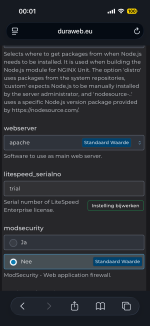
Also as you can see in the screenshot of custombuild at webserver apache.
 

Attachments

  • IMG_0883.png
    IMG_0883.png
    265.3 KB · Views: 14
Well i followed the minimal install recommended by directadmin of my almalinux 9, and the rest with custombuild inside directadmin. There is nothing that i installed myself than just that, all quire straightforward. And i use always apache instead of nginx,
Also as you can see in the screenshot of custombuild at webserver apache.
Then it is unclear why you have that "httpd" file present. I recommend to move out that "httpd" file from "/etc/logrotate.d/" directory and then check if you can start/restart "logrotate" service.
 
This seems odd to me when using apache. Both apache and httpd? While there should be in fact nothing to be seen here as a result of the output. Seems indeed 2 versions are installed somehow.
That has always been that way when installing apache as your webserver with almalinux, when i need apache to stop i have to use httpd as a command to stop and not apache. Also in the services it only shows httpd that is running and not apache, that has always been the case since i have run the webserver even after a new install.
 
pre-installed don't need it. just setup the swap, run basic "update" command and reboot into latest kernel.

Then setup directadmin.
 
when i need apache to stop i have to use httpd as a command
Yes that is normal, same like Mariadb is installed but you use the mysqld command to restart. However the httpd file should not exist in the logrotate file, only the apache file, so that is what's making use curious as to why that appears there.
 
Yes that is normal, same like Mariadb is installed but you use the mysqld command to restart. However the httpd file should not exist in the logrotate file, only the apache file, so that is what's making use curious as to why that appears there.
That is solved now, but now I don't get emails in, but out works
 
Back
Top