

Hi!
I thought id share our plugin I’ve been using for the last couple of years, initially written and used internally for the DA servers I manage (~70).
Unlike the RBL checks in CSF/LFD (that most of us use) which focus mainly on mail related blacklists. This simple plugin checks your server IP against a large number of blocklists instead of just the usual mail related RBLs.. helpful when looking into abuse reports, checking server IP reputation, or understanding why certain services might block or limit your server.
Recently I cleaned up the code, removed parts specific to my setup, to make it available publicly as requested.
Features:
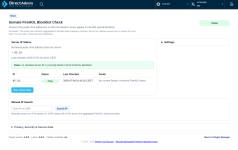
* Check all public IPv4* addresses configured on the DA server
* Show which blocklists currently include an IP
* Display categories, source links, timestamps, and feed information
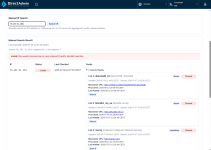
* Able to perform manual IP lookups
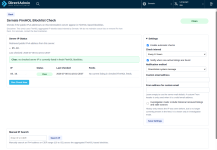
* Run automatic checks every 8, 12, or 24 hours
* Send email notifications when new (active) listings are found either by default DA messaging system or custom email
As said, standard RBL checks are useful for diagnosing mail delivery problems, but many providers also use other reputation sources (such as abuseipdb.com and blocklist.de). I do the same with csf.blocklists on the DA servers I manage.
In my own setup I collect firewall and other (abuse) data centralized in Opensearch. Sometimes I notice an IP that isn’t being blocked and want to know why. The manual lookup makes it easy to see which blocklists already contain that IP, helping me for example decide whether a particular feed is worth using in my own firewall setup.
To be clear; the plugin does not make any changes to your firewall or its rules and does not block anything. It simply performs an API request to my API using your server(s) IP address(es) and displays the information returned by the API. A listing does not by default mean there is a problem. I cannot remove listings; if you believe one is incorrect, please contact the maintainer of the mentioned blocklist. The plugin itself is intentionally lightweight, read-only.
Download, more info and install instructions:
https://github.com/WeszNL/directadmin-firehol-ip-blocklist-check
Full list of blocklists it check against: here
* IPv6 is on the raodmap, and actively working on jt. The current index is optimized for fast IPv4 and CIDR lookups. Supporting IPv6 efficiently requires reworking part of the indexing logic to handle the much larger address space, and to keep everything fast, it'll take a bit of time.
Feedback or feature requests are welcomed.
Tl:dr: automatically check if any of your server(s) IP is listed on any (Fireholl aggregated) blocklists.
AI slop disclaimer:
AI (local LLM) was only used as a tool to help optimize code and improve the wording and styling (design, not my thing). The plugin itself is my own work.
I thought id share our plugin I’ve been using for the last couple of years, initially written and used internally for the DA servers I manage (~70).
Unlike the RBL checks in CSF/LFD (that most of us use) which focus mainly on mail related blacklists. This simple plugin checks your server IP against a large number of blocklists instead of just the usual mail related RBLs.. helpful when looking into abuse reports, checking server IP reputation, or understanding why certain services might block or limit your server.
Recently I cleaned up the code, removed parts specific to my setup, to make it available publicly as requested.
Features:
* Check all public IPv4* addresses configured on the DA server
* Show which blocklists currently include an IP
* Display categories, source links, timestamps, and feed information
* Able to perform manual IP lookups
* Run automatic checks every 8, 12, or 24 hours
* Send email notifications when new (active) listings are found either by default DA messaging system or custom email
As said, standard RBL checks are useful for diagnosing mail delivery problems, but many providers also use other reputation sources (such as abuseipdb.com and blocklist.de). I do the same with csf.blocklists on the DA servers I manage.
In my own setup I collect firewall and other (abuse) data centralized in Opensearch. Sometimes I notice an IP that isn’t being blocked and want to know why. The manual lookup makes it easy to see which blocklists already contain that IP, helping me for example decide whether a particular feed is worth using in my own firewall setup.
To be clear; the plugin does not make any changes to your firewall or its rules and does not block anything. It simply performs an API request to my API using your server(s) IP address(es) and displays the information returned by the API. A listing does not by default mean there is a problem. I cannot remove listings; if you believe one is incorrect, please contact the maintainer of the mentioned blocklist. The plugin itself is intentionally lightweight, read-only.
Download, more info and install instructions:
https://github.com/WeszNL/directadmin-firehol-ip-blocklist-check
Full list of blocklists it check against: here
* IPv6 is on the raodmap, and actively working on jt. The current index is optimized for fast IPv4 and CIDR lookups. Supporting IPv6 efficiently requires reworking part of the indexing logic to handle the much larger address space, and to keep everything fast, it'll take a bit of time.
Feedback or feature requests are welcomed.
Tl:dr: automatically check if any of your server(s) IP is listed on any (Fireholl aggregated) blocklists.
AI slop disclaimer:
AI (local LLM) was only used as a tool to help optimize code and improve the wording and styling (design, not my thing). The plugin itself is my own work.
