Wordpress Redis plug-in

ericosman

Verified User
Joined
Nov 25, 2019
Messages
723
Location
Weert
Hi all,

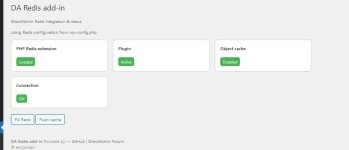
Because i was sick of editing wp-config.php manual everytime i made this simple Wordpress plug-in that does the following:
  • Installs and activates the Redis Object Cache plugin automatically
  • Configures Redis to use the correct DirectAdmin UNIX socket
  • Detects the hosting user dynamically (no manual config needed)
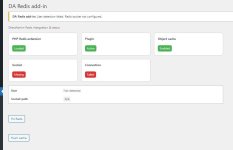
  • Provides a clear status dashboard (plugin, object cache, socket, connection, PHP extension)
  • Includes one-click actions to fix issues and flush the cache
If people have more idea's or comments let me know!

edit: uploaded the correct version.
 

Attachments

Last edited:
Very nice, thank you :)
Just one small thing about the version: In the php file it shows "Version: 4.0", after install in the "diagnose" tab "Plugin Version: 2.7.0"
 
If you want the real suggestion, try push to github. People can easy read the code without downloading / extract files.
 
Code:
    if (($i = array_search('home', $parts)) !== false) {
I know, this just compatible when env() can't get the user Home directory.

But the issued will happending, when hosting using difference Home dir, like "/home2", "/partition2" .
 
Code:
    if (($i = array_search('home', $parts)) !== false) {
I know, this just compatible when env() can't get the user Home directory.

But the issued will happending, when hosting using difference Home dir, like "/home2", "/partition2" .
The new version should take care of that
:)
 
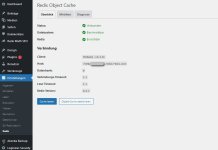
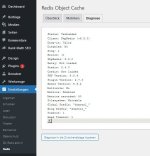
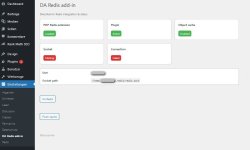
The add-in shows (falsely) "socket missing" and "connection failed", whereas the plugin shows all ok. (And yes, redis is activated in DA backend too)

Entries in wp-config.php are there:

// DirectAdmin Redis
define('WP_REDIS_SCHEME', 'unix');
define('WP_REDIS_PATH', '/home/[username-redacted]/.redis/redis.sock');

Please see att. screenshots
 

Attachments

  • redis plugin shows ok.jpg
    redis plugin shows ok.jpg
    42.6 KB · Views: 5
  • plugin diagnose ok.jpg
    plugin diagnose ok.jpg
    42.9 KB · Views: 5
  • addin shows socket missing.jpg
    addin shows socket missing.jpg
    40.9 KB · Views: 5
The add-in shows (falsely) "socket missing" and "connection failed", whereas the plugin shows all ok. (And yes, redis is activated in DA backend too)

Entries in wp-config.php are there:

// DirectAdmin Redis
define('WP_REDIS_SCHEME', 'unix');
define('WP_REDIS_PATH', '/home/[username-redacted]/.redis/redis.sock');

Please see att. screenshots
Hi,

Could you check with version 0.2 ?
 
the code still fail to detect the user Home Dir like "/partition2/user1/"

# da_redis_socket_path()
Code:
    return $user ? "/home/{$user}/.redis/redis.sock" : null;
 
Suggestion the code changed.
Code:
function da_redis_socket_path() {

    // Prefer wp-config
    if (defined('WP_REDIS_PATH') && WP_REDIS_PATH) {
        return WP_REDIS_PATH;
    }
    
    $socket_path = $_SERVER['HOME'] ?? getenv('HOME') ?? null;
    if($socket_path){
        //$socket_path = {ANY_HOME_DIR}/.redis
        $socket_path = dirname($socket_path) . DIRECTORY_SEPARATOR . ".redis";
        
        //Separate directory checking from "redis.sock"
        if(file_exists($socket_path) && is_dir($socket_path)){
            return $socket_path . DIRECTORY_SEPARATOR . "redis.sock";
        }
    }
    
    $user = da_redis_get_user();
    return $user ? "/home/{$user}/.redis/redis.sock" : null;
}
 
Back
Top