PHP version list

Cool thanks for trying it out :D

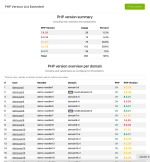
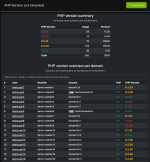
i've just come around to produce some screenshots with demo data. See attached files.

Maybe it's time to open a thread in the 3rd party software about this.
 

Attachments

  • Scherm­afbeelding 2025-12-03 om 22.48.23.png
    Scherm­afbeelding 2025-12-03 om 22.48.23.png
    370.3 KB · Views: 12
  • Scherm­afbeelding 2025-12-03 om 22.48.37.png
    Scherm­afbeelding 2025-12-03 om 22.48.37.png
    345.7 KB · Views: 11
Sweet! Obvs I only spun this up and popped 8.3, 8.4, and 8.5 on it. Looking at the above, I'm liking the colour scheme for older and deprecated versions of PHP. Would be a great feature if you could bulk select the accounts and force them to a newer version of PHP (After notifying customers) but quite promising from a security standpoint. It's good to know what your customers are doing
 
Thats strange. I tested it on two of my servers. A bit older one still on centos 7. and a new one on almalinux (on litespeed enterprise) Do you have this option in your directadmin configuration set to 0 by any chance? https://docs.directadmin.com/change...as-configuration-option-from-directadmin-conf What DA version are you on?

please try this version if it works for you. https://github.com/TLWebdesign/PHP-...nload/V1.0.2/php_version_list_extended.tar.gz
No, i dont have that line in directadmin.conf. Its DA v1.690 (latest on current channel). And I just tried on another Litespeed Pro Server (Almalinux 8), same error :-(
But its no problem for me, if i am the only one. I have the other plugin from RealityHost, v1.8.0, running, and this works. Will ask my linux admin tomorrow too.
 
Since the php version list plugin is not updated in a while i took it on me to extend it. You can find an updated version here. If you find any issues please let me know so i can update the plugin.

Happy that my version was being used as a starting point and thank you for your version.
I just installed it and it looks amazing what you made of it!
 
In DA i get the error "Sorry, but the page you are looking for can`t be found" when clicking on the "PHP Version List Extended" under "Extra Features" in Evo Skin. Tried first version 1.0.1, updated to 1.0.2, both.
Edit: on OpenLiteSpeed

Fixed by:

Bash:
cd /usr/local/directadmin/plugins
mv php_version_list_extended_1 php_version_list_extended

probably wrong installation method or source file.
 
Fixed by:

Bash:
cd /usr/local/directadmin/plugins
mv php_version_list_extended_1 php_version_list_extended

probably wrong installation method or source file.
Ahhh well then the filename was not exactly the same as the plugin id. I have had this also. Is there a way to force it to install in the correct directory? It’s kinda crazy that the plugin system installs in the directory the zip file is named instead of just the plugin id in the conf file.
 
Is there a way to force it to install in the correct directory? It’s kinda crazy that the plugin system installs in the directory the zip file is named instead of just the plugin id in the conf file.

A name of the source file with the plugin should match its ID. It is a vital requirement. Alternatively you might try and use the commands from my previous reply in the script: scripts/install.sh shipped with the plugin, i.e. here: https://github.com/TLWebdesign/PHP-Version-List-Extended/blob/master/scripts/install.sh
 
A name of the source file with the plugin should match its ID. It is a vital requirement. Alternatively you might try and use the commands from my previous reply in the script: scripts/install.sh shipped with the plugin, i.e. here: https://github.com/TLWebdesign/PHP-Version-List-Extended/blob/master/scripts/install.sh
This breaks writing to the plugin directory. By the time my install.sh runs it has not yet copied the data to the directory. And if i rename it, it is unable to "fill" the directory anymore.
 
By the time my install.sh runs it has not yet copied the data to the directory.

Actually I'm sure the opposite the scripts/install.sh is executed when all data is unpacked. The issue here might be that the script can not rename its parent's directory. I did not test it though.

I don't know why the issue exists at all. If the source file can not be named the same as the plugin ID, you might think of using 2 plugins instead of one in this case:

1. the plugin installer
2. the actual plugin

The plugin installer (named as something like phpver_plugin_installer) might consist of scripts/install.sh and other required files. An admin will install this plugin installer in Web-UI of Directadmin. At the moment of the installation the scripts/install.sh will run git pull/checkout to get the latest version of the actual plugin and install the things into /usr/local/directadmin/plugins/php_version_list_extended/ folder.

Then at the first run the plugin php_version_list_extended removes data of the plugin installer.

This is a raw idea, never tested by me. Probably too complicated, but still might have a chance to exist.

 
Actually I'm sure the opposite the scripts/install.sh is executed when all data is unpacked. The issue here might be that the script can not rename its parent's directory. I did not test it though.

I don't know why the issue exists at all. If the source file can not be named the same as the plugin ID, you might think of using 2 plugins instead of one in this case:

1. the plugin installer
2. the actual plugin

The plugin installer (named as something like phpver_plugin_installer) might consist of scripts/install.sh and other required files. An admin will install this plugin installer in Web-UI of Directadmin. At the moment of the installation the scripts/install.sh will run git pull/checkout to get the latest version of the actual plugin and install the things into /usr/local/directadmin/plugins/php_version_list_extended/ folder.

Then at the first run the plugin php_version_list_extended removes data of the plugin installer.

This is a raw idea, never tested by me. Probably too complicated, but still might have a chance to exist.
Actually the problem exists when people download the tar.gz file from my github. But they already have an existing file in their downloads folder so it gets renamed and appended with _1. then when they try to install _1 it installs without issues but of course in the wrong folder.

That is likely what happened. On my github you can see that i add the correct filename to the repo and to the releases manually. So it's not an issue to set the correct filename. the issue happens when people download it and later upload it to their DA install using the GUI.

I also did not perform very clean testing on this so i'm not 100% sure. I just noticed i ended up with an empty folder.

Now i wrote it so it just deletes the folder if it doesn't match and instructs the users what to do next. eg rename the file and install again.
 
Actually the problem exists when people download the tar.gz file from my github. But they already have an existing file in their downloads folder so it gets renamed and appended with _1. then when they try to install _1 it installs without issues but of course in the wrong folder.

OK, I see. Then you might instruct users to NOT download the plugin, but specify the URL to the source file in DirectAdmin on the plugin manager page.
 
As an alternative directadmin developers might review this part of the code and make it to choose a plugin directory based on a PLUGIN ID instead of a name of a source file.
 
As an alternative directadmin developers might review this part of the code and make it to choose a plugin directory based on a PLUGIN ID instead of a name of a source file.
Thats what i would expect it to do. The way it works now is extremely fragile. I write custom extensions for Joomla CMS as core business and i can't imagine having to provide exact package file names for stuff to work properly. 😅
 
You might add a function to modify a PHP version on the page per a domain as well as a group action per user, a group action per a PHP version)
That would be a nice addition but i'd def would need help because although i know php. i don't know much about best practices regarding DA and such.
 
I gave a reply yesterday but can't find it anymore. Maybe I forgot to press the button or it's in another thread.
Anyway, my question was if this addon will work everywhere, or rathre... does it also work in Enhanced skin?
 
Back
Top