
Hi
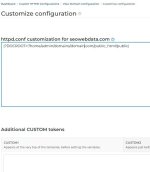
just a quick one, I need to change the documentroot for a particular domain. i can edit the httpd.conf it and it works, but is this file written over by directadmin /usr/local/directadmin/data/users/admin/httpd.conf? which is the actual file I need to edit? I tried using the httpd.conf cusomtization from within the control panel but I'm not sure what i was doing with that, it was just duplicating entries. i would rather just edit the file itself directly, can anyone advise which file to edit?
Thanks in advance
just a quick one, I need to change the documentroot for a particular domain. i can edit the httpd.conf it and it works, but is this file written over by directadmin /usr/local/directadmin/data/users/admin/httpd.conf? which is the actual file I need to edit? I tried using the httpd.conf cusomtization from within the control panel but I'm not sure what i was doing with that, it was just duplicating entries. i would rather just edit the file itself directly, can anyone advise which file to edit?
Thanks in advance

 -all-web-server-templates-use-docroot-token