
changing documentroot, what file to edit?

roly

Verified User
Joined
Nov 9, 2006
Messages
167
Hi

just a quick one, I need to change the documentroot for a particular domain. i can edit the httpd.conf it and it works, but is this file written over by directadmin /usr/local/directadmin/data/users/admin/httpd.conf? which is the actual file I need to edit? I tried using the httpd.conf cusomtization from within the control panel but I'm not sure what i was doing with that, it was just duplicating entries. i would rather just edit the file itself directly, can anyone advise which file to edit?

Thanks in advance
 
Hello.
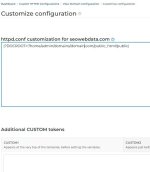
Custom HTTPD Configurations - httpd.conf - Customize -
|?DOCROOT=/home/user/new/new|
thank you, dumb question do i put that here? I tried that and i get an error "DocumentRoot takes one argument, Root directory of the document tree"
 

Attachments

  • http.jpg
    http.jpg
    40.2 KB · Views: 10
hi, well that inserted |?DOCROOT=/home/admin/domains/domain.com/public_html/public| into /usr/local/directadmin/data/users/admin/httpd.conf

rather than the correct format and left the original documentroot there DocumentRoot "/home/admin/domains/domain.com/public_html"
 
That’s strange - are you checking the right domain? Could you send the full contents of httpd.conf via private message? Or post it here, but with sensitive data removed?
 
Code:
|?DOCROOT=`HOME`/domains/`DOMAIN`/project/public|

try this, I recommend to move your project out of default public_html dir, like into "{domain}/project/"
because sometime it might broken the DOCROOT and accident expose sensitive storage to public access


carefully the format must be : |?...| without contains any spaces
 
He says the override didn't work, which is strange since it has always worked fine. I checked on the test server, and it worked successfully there too.
 
Thanks guys for all your help it's appreciated. as it happened i decided to put this on it's own subdomain for another reason and fortunately i notice you can set the document root in that. However i need to change the httpd.conf for something else on this subdomain, but when i go to change it in the custom http.conf editor it only lists domain.com and not sub.domain. do i use the editor for the main domain (it doesn't matter if it puts the following entry on both main and sub domain?

i need to insert:

<Directory /var/www/domain.com/public>
AllowOverride FileInfo
</Directory>

where do i enter this?

thanks in advance
 
hi, well that inserted |?DOCROOT=/home/admin/domains/domain.com/public_html/public| into /usr/local/directadmin/data/users/admin/httpd.conf

rather than the correct format and left the original documentroot there DocumentRoot "/home/admin/domains/domain.com/public_html"

Hello,

Check it out. The core changes in Version 1.710

The web server configuration templates are updated. Key changes:
  • The DOCROOT token will be used for both domains and subdomains. Previous releases used the SDOCROOT token for subdomain document root.
  • Templates will no longer set or change the document root tokens inside the template. The main DOCROOT token will be set by the main DirectAdmin service before the template is evaluated.
  • The tokens REALDOCROOT and PUB_DOCROOT are completely removed. They were defined inside the templates but not used.
  • The token SDOCROOT will still be available. The value of this token will be the same as the main DOCROOT token.
Special care should be taken if the token DOCROOT is being changed in the CUSTOM[N] sections. It is still possible to change the document root by changing this token value. However, since subdomains are now using the token DOCROOT instead of SDOCROOT, a customised main document root can leak into the subdomain configuration.

- https://docs.directadmin.com/changelog/version-1.710.html#️-all-web-server-templates-use-docroot-token
 
Hello,

Check it out. The core changes in Version 1.710

The web server configuration templates are updated. Key changes:
  • The DOCROOT token will be used for both domains and subdomains. Previous releases used the SDOCROOT token for subdomain document root.
  • Templates will no longer set or change the document root tokens inside the template. The main DOCROOT token will be set by the main DirectAdmin service before the template is evaluated.
  • The tokens REALDOCROOT and PUB_DOCROOT are completely removed. They were defined inside the templates but not used.
  • The token SDOCROOT will still be available. The value of this token will be the same as the main DOCROOT token.
Special care should be taken if the token DOCROOT is being changed in the CUSTOM[N] sections. It is still possible to change the document root by changing this token value. However, since subdomains are now using the token DOCROOT instead of SDOCROOT, a customised main document root can leak into the subdomain configuration.

- https://docs.directadmin.com/changelog/version-1.710.html#️-all-web-server-templates-use-docroot-token
Thank you that's very helpful I will have a read!
 
Back
Top