
Have rspamd autolearn, different names for spamboxes on server? Which to use?

Richard G

Verified User
Joined
Jul 6, 2008
Messages
14,992
Location
Maastricht
Just asking this to be sure. I've set up rspamd and now trying to let rspamd learn automatically.
I've seen a guide but that had a several comments so I'm using the instructions from the DA docs:
https://docs.directadmin.com/other-...omatically-marking-moved-mail-to-junk-as-spam

Now the question is about the middle part.
if environment :matches "imap.mailbox" "spam" {
and
if environment :matches "imap.mailbox" "Trash" {

Below there is a link:
Related: spam_inbox_prefix_name=INBOX.spam

In the docs I see "spam" and "ham" and in the sa-learn copy part there is "spam" again

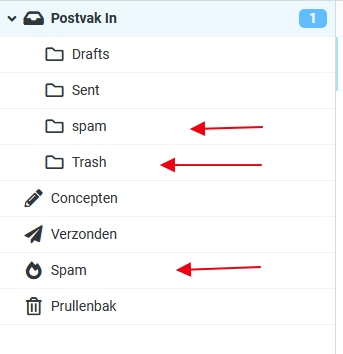
If I check the DA mailboxes in webmail I see this:
1795915159274.png

So 2 different boxes called spam (1 with capital and one not) and a Trash folder.

When checking as root in the mailbox folders I see they all heb the INBOX prefix and one without and with a dot in front of the name and even one with a complete different name, like this.
.INBOX.spam
.INBOX.Trash
.Junk (this one I don't see in webmail)
.Trash

I'm not native English so this is very confusing to me. When following the docs, can I just copy and paste the instructions?
Or do I need to change everywhere where it says "spam" to .INBOX.spam or INBOX.spam without the dot in front?
And I don't have any "ham" folder which I read here:
pipe :copy "sa-learn.sh" [ "ham" ];

And what is the .Junk and .Trash then for which are not visible in webmail?
 
I've seen a guide but that had a several comments so I'm using the instructions from the DA docs:
https://docs.directadmin.com/other-...omatically-marking-moved-mail-to-junk-as-spam

The guide is for SpamAssassin, it won't work for rSpamd. See it says:

This guide describes the steps required to teach SpamAssassin

There was a guide for rSpamd on the forums somewhere. I don't have a link to it in my records, so you will need to find it on your own.

Anyway the only part that needs a change is the script: /usr/local/bin/dovecot-sieve/sa-learn.sh which is designed for SpamAssassin only. It won't do anything to rSpamd.

The other parts should work fine without changes.
 
Do not use the leading dot in the Sieve rules. That dot is Maildir’s on-disk directory syntax, not the IMAP mailbox name. So .INBOX.spam on disk is normally INBOX.spam to Dovecot, and .Junk is Junk.
Also, ham in sa-learn.sh [ "ham" ] is not a folder name. It is the learning mode passed to the classifier.
The bigger issue is that the linked DirectAdmin section currently says it is for SpamAssassin and its helper calls /usr/bin/sa-learn. Therefore I would not copy it unchanged for Rspamd. First confirm the logical mailbox names with doveadm mailbox list -u [email protected]; this also explains why .Trash and .INBOX.Trash can coexist, while Roundcube may only show subscribed folders.
DirectAdmin documents spam_inbox_prefix_name=INBOX.spam only when spam_inbox_prefix=1 is enabled. Pick one actual Junk mailbox name, use that consistently in the imapsieve rules, then connect the helper to Rspamd’s learner rather than assuming the shown sa-learn.sh applies.
DirectAdmin guide
 
There was a guide for rSpamd on the forums somewhere.
That might be this one:

Anyway the only part that needs a change is the script: /usr/local/bin/dovecot-sieve/sa-learn.sh
Does this relate to the original DA doc? If yes, then I might be able to use the orignal doc from da and just replace the sa-learn.sh by the rspamd-learn.sh script in part 4 of the guide here on the forums? Do I understand this correctly? Would make live a lot easier.

I've also seen some scripts on your github but that also says SA so I presume that only works for SA, right?

rather than assuming the shown sa-learn.sh applies.
DirectAdmin guide
Yes but zEitEr stated this was only for Spamassassin so I can't follow that guide.

The doveadm command shows me this output, without explanation.
Junk
Trash
Sent
Drafts
INBOX.Sent
INBOX.Drafts
INBOX.Trash
INBOX.spam
INBOX
So yes they co-exist but explain nothing. Stronger, it makes it more confusing to me. Junk folder does not exist in Roundcube, while Spam (with capital S) does, and that one does not exist here in the output, which confuses me about it's presense in Roundcube.

Edit: Just tested what is where a bit and something very odd happens. If I put a mail in the Spam (with begin capital) folder in Roundcube, then it will occur in the users .Junk/cur folder which is not visible so most likely not subsribed to in normal mail programs like Office Outlook, because that one only sees it when I move the mail to the "spam" folder in Roundcube, which in ssh is in fact the INBOX.spam folder.

Pick one actual Junk mailbox name, use that consistently in the imapsieve rules
I presume I have to pick one that is also visible in Roundcube too in that case. That would be INBOX.spam then as that is the only folder present both in the command output and in Roundcube and mail programs (test above), is that correct?
Or do I still misunderstand?

Sorry about all my questions, never been busy with mailboxes and all those different names just work confusing to me.
 
Last edited:
Back
Top