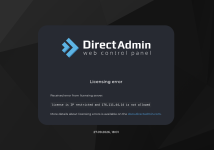
Internal lifetime license (UID 11247 / LID 83103) — datacenter destroyed by missile strike, need new netblock allowed

Alehey

New member
Joined
Sep 27, 2026
Messages
6
Hello DirectAdmin team,


The ticket system rejects my license as internal and redirects me to isplicense, who refuse to help, so I am posting here as the ticket page advises.


License details:


  • Client ID (UID): 11247
  • License ID (LID): 83103 (my old notes also mention LID 40091 — one of these two is correct)
  • Reseller record: ISPsystem / isplicense, "DirectAdmin Lifetime #36229"
  • Purchased: February 2009, lifetime license, approx. $100, bundled with a rented dedicated server
  • Old server IP: 176.103.57.101 (license also covered the range 176.103.48.x – 176.103.59.x)
  • New server IP: 176.111.44.14
  • DirectAdmin version: 1.711

Situation:
This is an internal (datacenter) license bundled with server rental. I have been renting a server from the same hosting company in Kyiv, Ukraine since 2008 — the company changed owners several times, but I remained their customer the whole time, and the license always came together with the server.


The datacenter in Kyiv where the server was located was physically destroyed by a missile strike. The old server and the old IP range are gone permanently. The hosting provider restored my server from backup at a new location. The server is still rented from the same provider, but their new IP range is 176.111.44.0/24. The licensing check now returns:
license is IP restricted and 176.111.44.14 is not allowed


I asked isplicense to update the IP; they answered that IP changes are not possible for this license type (screenshot attached). The hosting provider says they cannot restore the old IP and does not know how to proceed.


Request:
Could you please advise how to get 176.111.44.14 (or the netblock 176.111.44.0/24) allowed for this license? Either by registering the provider's new netblock, by adding the IP directly, or by converting the license to an external one under my own account. I can provide any proof you need: correspondence with isplicense, server access, my history with the hosting provider. The license serves a few of my own websites hosted since 2008.
3a877ec5-5099-4291-9b32-12be1d4a89b8.jpg


Thank you very much for your help.
 

Attachments

  • a2502c3b-d129-47be-9c06-7d25c07d4e4d.png
    a2502c3b-d129-47be-9c06-7d25c07d4e4d.png
    730.5 KB · Views: 15
The hosting provider is in fact real owner of the license. They should contact Directadmin for a solution, not you.
Thank you. I understand that the hosting provider is the formal owner. The problem is that I am stuck between the two sides: the provider asked their license source (isplicense, screenshot above) and got the answer that "DirectAdmin does not allow changing IP addresses for this license type", so the provider considers the matter closed and does not know whom to contact next. The ticket system, in turn, rejects my request as an internal license and points back to isplicense.


I am not asking for anything to be done for me personally — I am only asking DirectAdmin to tell me exactly what the provider (or isplicense) needs to do so that the license can work from the provider's new netblock 176.111.44.0/24 after the old datacenter was destroyed. If there is a specific procedure or contact, I will pass it to the provider immediately.


@DirectAdmin Sales — could you please advise?
 
@Alehey The only permissible use of internal licenses is the server provider bundling it together with the server rental. The provider changing IP space is not really an issue, as those netblocks can be added to their account so their license keys work within that new space.

Trying to understand what you said -- it sounds like you purchased a datacenter license by itself, from a totally different party than who you are renting the server from? If this is the case, that would not be permitted, and the solution would be to see if your server provider has internal licenses they can bundle with the rental, or use a retail license that has no IP restrictions at all.
 
probably BIZ1 sold company to someone else to BIZ2 -> 3 -> 4 -> 5, ..etc.. , that's meant it's impossible to update the IP range for those Licenses.
 
@Alehey The only permissible use of internal licenses is the server provider bundling it together with the server rental. The provider changing IP space is not really an issue, as those netblocks can be added to their account so their license keys work within that new space.

Trying to understand what you said -- it sounds like you purchased a datacenter license by itself, from a totally different party than who you are renting the server from? If this is the case, that would not be permitted, and the solution would be to see if your server provider has internal licenses they can bundle with the rental, or use a retail license that has no IP restrictions at all.
@DirectAdmin Sales Thank you, this is very helpful. Let me clarify, because it is the permitted case:


I did not buy the license separately. I have been renting a server from the same hosting company since 2008, and the DirectAdmin license was bundled with the server rental by that company. I am still renting the server from them today. The company has changed owners several times over the years, but it is the same hosting business and I stayed their customer the whole time.


My hosting provider obtains their DirectAdmin licenses through ISPsystem / isplicense (my license is their service "DirectAdmin Lifetime #36229"). After the datacenter was destroyed, the provider moved to a new netblock 176.111.44.0/24. When the provider asked isplicense to allow the new IP, isplicense replied that "DirectAdmin does not allow IP changes for such licenses" (screenshot in my first post), so both the provider and I got stuck.


Based on your answer, the correct action is for the account holder to add the new netblock 176.111.44.0/24 to their account. Could you confirm: is the account holder in this case isplicense (as the entity that holds the DA client account), and is adding a netblock something they can do themselves in the client area, or do they need to request it from DirectAdmin? I will forward your answer to the provider and to isplicense right away.
 
@DirectAdmin Sales Some additional context, to make the picture complete.


Yes, the hosting company has changed owners several times since 2008 — but it has always been the same hosting business, and I have always been their customer. My server always stayed with them: when they moved between datacenters, my physical server moved with them; later, when it became more efficient, we replaced my old hardware with a virtual server — again with the same provider. So for almost 18 years the license has been used exactly as intended: bundled with a server rented from that provider.


Now the situation is this (screenshot attached — the provider's current status notice, in Russian). Translation of the key parts: "As a result of a Russian drone attack, our datacenter in Kyiv was damaged. Recovery is ongoing; power has been restored, network is being restored. Our engineers will go on site only when the security situation allows — attacks on datacenters continue daily. We have backups of virtual servers as of September 18. Contact support to restore virtual servers in other locations (with IP address change)."


So the provider is right now urgently restoring customer servers on new hardware, possibly outside Ukraine, with new IP addresses. Everything they restore comes back online — except projects running under DirectAdmin, because the licenses are locked to the old netblock.


The provider asked isplicense (where the DirectAdmin Lifetime licenses were purchased) to allow the new IP, and isplicense answered: "IP change is not possible for such licenses." Your answer here says the opposite — that new netblocks can be added to the account. I believe isplicense simply does not know the procedure.


What we need from you is the mechanism: how does the account holder (isplicense) add the new netblock 176.111.44.0/24 — and possibly further netblocks, as the provider is restoring servers in other locations — to their account, so the existing license keys work again? Is it a self-service option in the client area, or a request to DirectAdmin sales/support? With a clear answer I will pass it to both the provider and isplicense today.


Thank you very much — this affects not only my license but every DirectAdmin customer of this provider.
 

Attachments

  • нп.png
    нп.png
    26.7 KB · Views: 2
@Alehey please stop posting screenshots with information in russian, especially in case if the most people here do not understand that piece of language. Just translate it to English and add it as text or screenshots with the translation.
 
@Alehey please stop posting screenshots with information in russian, especially in case if the most people here do not understand that piece of language. Just translate it to English and add it as text or screenshots with the translation.
Apologies, you are right. Here are the translations of the screenshots I posted; I will not post untranslated screenshots again.


1. Reply from isplicense (license reseller), support ticket "IP change", 2026-09-27:
Me: "Hello! How can I change the IP address for this license?"
isplicense support (Lev Melnikov): "Hello. Unfortunately, this is not possible. DirectAdmin prohibited changing IP addresses for licenses many years ago."
Ticket information: Service name — DirectAdmin Lifetime #36229.


2. Reply from my hosting provider (email), 2026-09-27:
"We checked with isplicense support (where the DirectAdmin Lifetime license was purchased long ago). They replied that an IP change is not possible for this type of license. We also tried updating the license and logging in from the new address — still an error."


3. Hosting provider's status notice, updated 2026-09-28:
"Service degradation. As a result of a Russian drone attack, our datacenter in Kyiv was damaged. The recovery process is ongoing. Power has already been restored; work on restoring the network is in progress. Our engineers will go on site for a controlled, gradual restoration of our infrastructure only when the security situation allows. At the moment, terrorist attacks on datacenters continue daily. Please follow our updates here. We have backups of virtual servers as of September 18. Contact support to restore virtual servers in other locations (with IP address change)."


4. DirectAdmin ticket system response: "This is an Internal License on guest login. Please contact your license provider for technical support." (already in English)


5. DirectAdmin panel error: license is IP restricted and 176.111.44.14 is not allowed (already in English)
 
I am trying to ask people who are responsible for DA Licenses to check your post here and DA License details you sent closer and provide you the steps which should be taken to get that DA License working OK again. But it can take some time and there is no 100% guarantee that it will be done.
So, the fastest option to get your DA Panel working again as @DirectAdmin Sales mentioned is to buy and use your own DA License (but that option requires additional monthly payments ... )
 
I am trying to ask people who are responsible for DA Licenses to check your post here and DA License details you sent closer and provide you the steps which should be taken to get that DA License working OK again. But it can take some time and there is no 100% guarantee that it will be done.
So, the fastest option to get your DA Panel working again as @DirectAdmin Sales mentioned is to buy and use your own DA License (but that option requires additional monthly payments ... )
Thank you very much, romans — I really appreciate you escalating this. I understand there is no guarantee and it may take time; I will wait patiently for the licensing team's response and will not create any additional topics or tickets in the meantime. If they need any further details or proof from me or from the hosting provider, I will provide them immediately.


Thank you also for the tip about a retail license — I will keep it as the fallback option.
 
DirectAdmin prohibited changing IP addresses for licenses many years ago."
As @DirectAdmin Sales already wrote, this is not true.
The provider changing IP space is not really an issue, as those netblocks can be added to their account so their license keys work within that new space.
So that is what your ISP needs to do. Contact Directadmin themselves. DA will do nothing with your proof, the hosting provider needs to contact DA themselves.

If they don't or can't, then it's end of story and you need to get a license yourself unfortunately, or rent your server with a provider who still has working internal licenses.
However, be aware that newer OS (like Alma 10) can not be used with those licenses and the Mysql and MariaDB versions are EOL now too. So you still might be off best by getting a license yourself.
 
Back
Top