Reverse proxies using HTTPD config

jarred-Awesome

Verified User
Joined
Jun 20, 2025
Messages
5
Hey Everyone,

My Directadmin is set up on a server that uses Apache, as opposed to NGIN. I can't seem to find a good guide on how to set up a reverse proxy using Apache.

Ideally I want the settings to look like this:

Code:
<VirtualHost 123.456.78:80>
    ServerName subdoamin.mydomain.com
    ProxyPass / http://123.456.78:8080/
    ProxyPassReverse / http://123.456.78:8080/
</vitualHost>

<VirtualHost 123.456.78:443>
    ServerName subdoamin.mydomain.com
    ProxyPass / http://123.456.78:8080/
    ProxyPassReverse / http://123.456.78:8443/
</vitualHost>

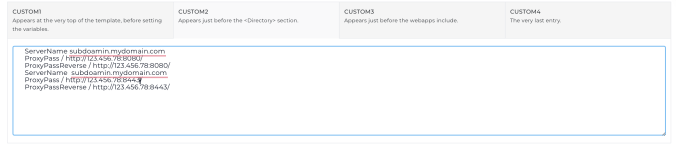
But I can only figure out how to do this:
Code:
<VirtualHost 123.456.78:80>
    ServerName subdoamin.mydomain.com
    ProxyPass / http://123.456.78:8080/
    ProxyPassReverse / http://123.456.78:8080/
    ServerName subdoamin.mydomain.com
    ProxyPass / http://123.456.78:8443/
    ProxyPassReverse / http://123.456.78:8443/
</vitualHost>

<VirtualHost 123.456.78:443>
    ServerName subdoamin.mydomain.com
    ProxyPass / http://123.456.78:8080/
    ProxyPassReverse / http://123.456.78:8080/
    ServerName subdoamin.mydomain.com
    ProxyPass / http://123.456.78:8443/
    ProxyPassReverse / http://123.456.78:8443/
</vitualHost>

I attahed a photo of how I did it.

Can someone explain the proper way to do this?

Thanks
 

Attachments

  • Screenshot 2025-07-14 at 10.20.00 AM.png
    Screenshot 2025-07-14 at 10.20.00 AM.png
    147.3 KB · Views: 134
Maybe, if there is documentation of how those scripts work?

This is an example, but no link to what the actual scripts are doing.

Sorry, I am very new to direct admin
 
Which scripts? If you want to learn what are those directives mean, then you need to read official docs from Apache website.
 
Which scripts? If you want to learn what are those directives mean, then you need to read official docs from Apache website.
I was refering to these conditions
Code:
|*if SSL_TEMPLATE="0"|
|?HAVE_PHP1_FCGI=0|
|?HAVE_PHP2_FCGI=0|

I don't think those conditional statements are standard apache. i can be wrong though
 
I don't think those conditional statements are standard apache. i can be wrong though

Yes, they are not from Apache. These directives are for DirectAdmin: TOKENs and IF-constructions.

You might start from here:

- https://docs.directadmin.com/directadmin/customizing-workflow/
- https://docs.directadmin.com/webservices/apache/customizing.html
- https://docs.directadmin.com/webservices/apache/customizing.html#using-a-custom-virtualhost-template
- https://docs.directadmin.com/gettin...for-nginx-openlitespeed-apache-configurations

and then search more information on "template" on https://docs.directadmin.com
 

Attachments

  • 2025-07-15_114247_docs.directadmin.com.png
    2025-07-15_114247_docs.directadmin.com.png
    135.6 KB · Views: 141
Hey Everyone,

My Directadmin is set up on a server that uses Apache, as opposed to NGIN. I can't seem to find a good guide on how to set up a reverse proxy using Apache.

Ideally I want the settings to look like this:

Code:
<VirtualHost 123.456.78:80>
    ServerName subdoamin.mydomain.com
    ProxyPass / http://123.456.78:8080/
    ProxyPassReverse / http://123.456.78:8080/
</vitualHost>

<VirtualHost 123.456.78:443>
    ServerName subdoamin.mydomain.com
    ProxyPass / http://123.456.78:8080/
    ProxyPassReverse / http://123.456.78:8443/
</vitualHost>

But I can only figure out how to do this:
Code:
<VirtualHost 123.456.78:80>
    ServerName subdoamin.mydomain.com
    ProxyPass / http://123.456.78:8080/
    ProxyPassReverse / http://123.456.78:8080/
    ServerName subdoamin.mydomain.com
    ProxyPass / http://123.456.78:8443/
    ProxyPassReverse / http://123.456.78:8443/
</vitualHost>

<VirtualHost 123.456.78:443>
    ServerName subdoamin.mydomain.com
    ProxyPass / http://123.456.78:8080/
    ProxyPassReverse / http://123.456.78:8080/
    ServerName subdoamin.mydomain.com
    ProxyPass / http://123.456.78:8443/
    ProxyPassReverse / http://123.456.78:8443/
</vitualHost>

I attahed a photo of how I did it.

Can someone explain the proper way to do this here?

Thanks
Two issues: the closing tag </vitualHost> should be </VirtualHost>, which would cause Apache to fail parsing the config, and in your second example the directives are duplicated inside the same block, Apache only honors the last occurrence, so the first set does nothing. Your first example is actually the correct structure, just fix the closing tag typo and make sure the ports match correctly between ProxyPass and ProxyPassReverse in each block. Also confirm mod_proxy and mod_proxy_http are enabled via a2enmod proxy proxy_http, and check DirectAdmin's Custom HTTPD config section since it can overwrite manual httpd.conf edits on rebuild.
 
Back
Top