Wordpress Redis plug-in

ericosman

Verified User
Joined
Nov 25, 2019
Messages
725
Location
Weert
Hi all,

Because i was sick of editing wp-config.php manual everytime i made this simple Wordpress plug-in that does the following:
  • Installs and activates the Redis Object Cache plugin automatically
  • Configures Redis to use the correct DirectAdmin UNIX socket
  • Detects the hosting user dynamically (no manual config needed)
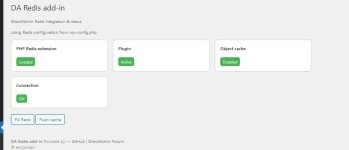
  • Provides a clear status dashboard (plugin, object cache, socket, connection, PHP extension)
  • Includes one-click actions to fix issues and flush the cache
If people have more idea's or comments let me know!

edit: uploaded the correct version.
 

Attachments

Last edited:
Very nice, thank you :)
Just one small thing about the version: In the php file it shows "Version: 4.0", after install in the "diagnose" tab "Plugin Version: 2.7.0"
 
If you want the real suggestion, try push to github. People can easy read the code without downloading / extract files.
 
Code:
    if (($i = array_search('home', $parts)) !== false) {
I know, this just compatible when env() can't get the user Home directory.

But the issued will happending, when hosting using difference Home dir, like "/home2", "/partition2" .
 
Code:
    if (($i = array_search('home', $parts)) !== false) {
I know, this just compatible when env() can't get the user Home directory.

But the issued will happending, when hosting using difference Home dir, like "/home2", "/partition2" .
The new version should take care of that
:)
 
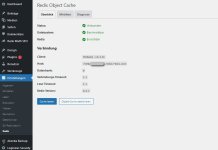
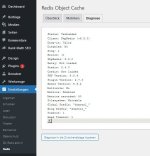
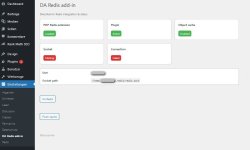
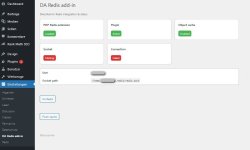
The add-in shows (falsely) "socket missing" and "connection failed", whereas the plugin shows all ok. (And yes, redis is activated in DA backend too)

Entries in wp-config.php are there:

// DirectAdmin Redis
define('WP_REDIS_SCHEME', 'unix');
define('WP_REDIS_PATH', '/home/[username-redacted]/.redis/redis.sock');

Please see att. screenshots
 

Attachments

  • redis plugin shows ok.jpg
    redis plugin shows ok.jpg
    42.6 KB · Views: 12
  • plugin diagnose ok.jpg
    plugin diagnose ok.jpg
    42.9 KB · Views: 12
  • addin shows socket missing.jpg
    addin shows socket missing.jpg
    40.9 KB · Views: 12
The add-in shows (falsely) "socket missing" and "connection failed", whereas the plugin shows all ok. (And yes, redis is activated in DA backend too)

Entries in wp-config.php are there:

// DirectAdmin Redis
define('WP_REDIS_SCHEME', 'unix');
define('WP_REDIS_PATH', '/home/[username-redacted]/.redis/redis.sock');

Please see att. screenshots
Hi,

Could you check with version 0.2 ?
 
the code still fail to detect the user Home Dir like "/partition2/user1/"

# da_redis_socket_path()
Code:
    return $user ? "/home/{$user}/.redis/redis.sock" : null;
 
Suggestion the code changed.
Code:
function da_redis_socket_path() {

    // Prefer wp-config
    if (defined('WP_REDIS_PATH') && WP_REDIS_PATH) {
        return WP_REDIS_PATH;
    }
    
    $socket_path = $_SERVER['HOME'] ?? getenv('HOME') ?? null;
    if($socket_path){
        //$socket_path = {ANY_HOME_DIR}/.redis
        $socket_path = dirname($socket_path) . DIRECTORY_SEPARATOR . ".redis";
        
        //Separate directory checking from "redis.sock"
        if(file_exists($socket_path) && is_dir($socket_path)){
            return $socket_path . DIRECTORY_SEPARATOR . "redis.sock";
        }
    }
    
    $user = da_redis_get_user();
    return $user ? "/home/{$user}/.redis/redis.sock" : null;
}
 
the code still fail to detect the user Home Dir like "/partition2/user1/"

# da_redis_socket_path()
Code:
    return $user ? "/home/{$user}/.redis/redis.sock" : null;
New version should take care of this, also has the ability to update the plug-in based on my Github.
 
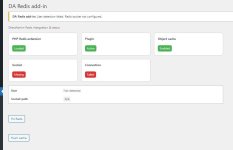
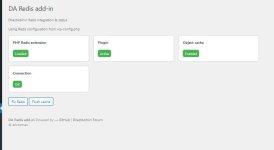
Just of curiosity .. there was an additional item "socket" in v0.2 (beside "PHP Redis extension", "Plugin", "Object cache" and "Connection"), which seems to be missing in v0.3 versions upwards. And the "user" and "socket path" fields are also gone.
 

Attachments

  • addin shows socket missing.jpg
    addin shows socket missing.jpg
    40.9 KB · Views: 2
  • da redis plugin - v0.5.jpg
    da redis plugin - v0.5.jpg
    22.3 KB · Views: 2
It's because it checks the wp-config.php now and takes that as a truth.
Because sometimes it would give a false negative while it did work, so i decided to remove it.
 
Back
Top